

Indoor golf simulators have transformed from luxury items reserved for tour pros into accessible training tools for everyday golfers. With 2026 technology pushing accuracy and realism to new heights, choosing the right system for your home setup requires understanding the latest launch monitor capabilities, space requirements, and software options that match your skill level and budget.
The simulator market has exploded with options ranging from $500 portable units to $50,000 commercial-grade systems. Your ideal setup depends on factors like ceiling height, available space, swing speed data needs, and whether you prioritize entertainment or serious game improvement. Let’s break down exactly what you need to know before investing in a home golf simulator this year.
Understanding Launch Monitor Technology in 2026
Launch monitors form the brain of any simulator setup, and 2026 brings significant improvements in camera-based and radar technologies. Camera systems like the Uneekor EYE XO2 now capture over 20 data points per shot with accuracy rivaling $40,000 units from just five years ago. These systems track club path, face angle, attack angle, and ball spin with precision that helps you diagnose swing flaws immediately.
Radar-based units like the Trackman 4 and Foresight Sports GCQuad deliver tour-level accuracy but come with premium price tags. The benefit? These systems work outdoors too, giving you versatility beyond your indoor space. For most home users, camera-based systems offer the best value since you’ll primarily use them indoors where lighting conditions stay consistent.
Here’s what separates the technology tiers in 2026. Entry-level systems ($500-$2,000) use smartphone cameras or basic sensors to estimate ball flight. Mid-range options ($2,000-$10,000) employ dedicated cameras with infrared technology for accurate club and ball data. Premium systems ($10,000+) utilize multiple high-speed cameras or advanced radar to capture every nuance of impact, delivering data that matches what tour pros see on range.
Before watching detailed comparisons, here’s an expert breakdown of the top simulators available right now.
This comprehensive review highlights the accuracy differences between systems and shows real-world performance across multiple price points. The key takeaway is that 2026 camera technology has narrowed the gap considerably, making mid-range options viable for serious players.
Space Requirements and Room Setup Essentials
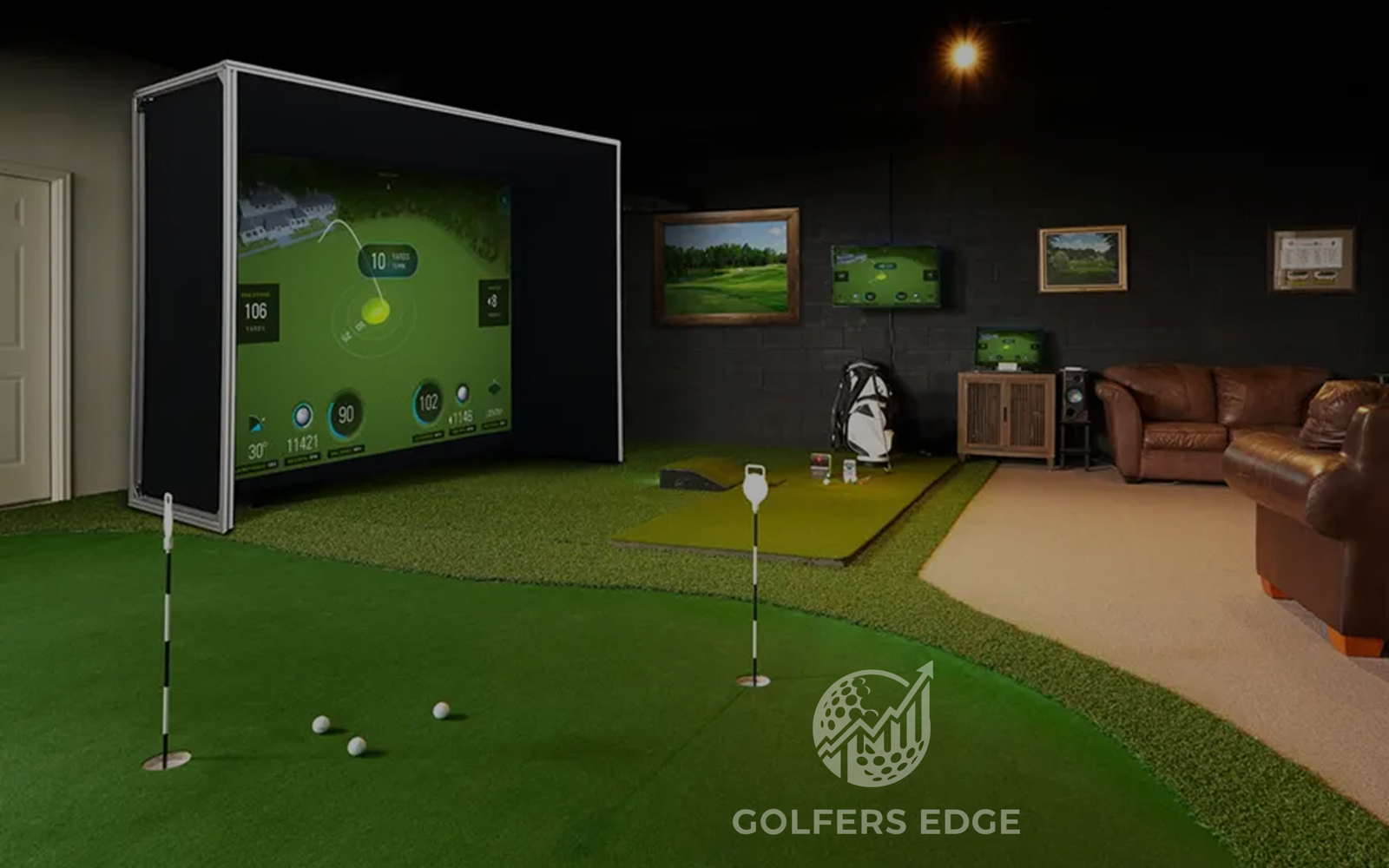
Your ceiling height determines which systems you can realistically use. You need minimum 9 feet for most setups, but 10 feet gives you comfortable clearance for full swings with a driver. Measure your highest point at address and add 18 inches for safety. Many golfers with 8-foot ceilings successfully use simulators by choking down slightly or focusing on iron play.
Width and depth matter just as much as height. A comfortable hitting area requires 10 feet wide by 15 feet deep minimum. This gives you room for the hitting mat, screen placement at proper distance, and space behind you for setup. If you’re working with a smaller area, some systems like the SkyTrak+ or Garmin Approach R10 function in tighter spaces by positioning closer to the screen.
Impact screens and projectors complete your physical setup. Quality impact screens range from $300 generic options to $2,000 Carl’s Place professional enclosures. The projector sweet spot sits around $1,200-$2,000 for bright, short-throw models that handle ambient light well. Position your projector so it sits slightly above and behind your hitting position to avoid shadows during your swing.
Flooring needs attention too. Your hitting mat should rest on a solid, level surface. Concrete works perfectly, while carpeted areas may require a plywood base for stability. Quality mats with replaceable turf cost $400-$1,200 and significantly affect feel and joint impact during extended practice sessions.
Budget-Friendly Options Under $5,000
The Garmin Approach R10 leads the budget category at around $600. This portable unit connects to your smartphone or tablet and provides 14+ metrics including clubhead speed, ball speed, smash factor, and estimated distances. While it doesn’t offer the precision of premium systems, it delivers enough data for most mid-handicappers to improve their ball striking and course management.
SkyTrak+ (approximately $3,000) bridges the gap between entry and mid-range categories with photometric technology that measures actual ball flight. The shot accuracy improvement over basic systems is substantial, especially for spin measurements. The subscription-based software includes dozens of famous courses and game improvement modes that keep practice sessions engaging.
For launch monitor options specifically designed for home use, here’s a detailed comparison of what works best at different price points.
The video demonstrates how systems under $5,000 now provide data quality that helps single-digit handicappers practice effectively. The main limitation versus premium options shows up in very short game shots and putting accuracy.
Mid-Range Systems for Serious Players
The Foresight Sports GC3 (around $7,000) represents the sweet spot for dedicated golfers who want tour-level ball data without the premium system price tag. Using high-speed camera technology, it captures ball speed, launch angle, spin rates, and side spin with exceptional accuracy. The GC3 works both indoors and outdoors, making it valuable for range sessions too.
Uneekor’s EYE XO series ($7,000-$9,000) has become the darling of custom fitting studios and serious home setups. These overhead camera systems capture both club and ball data, giving you insights into swing path, face angle, and impact location, similar to the comprehensive data analysis you’d get when learning how to increase your golf swing speed with professional instruction.
Full Swing KIT (approximately $6,000) offers a complete package approach with their launch monitor, software access, and integration options. The system excels at creating realistic ball flights on screen and includes automatic club recognition. If you want a plug-and-play solution without piecing together components, this deserves consideration.
Software subscriptions add $300-$1,000 annually depending on your system and desired course library. Most mid-range options include basic software, but premium course packages and advanced analytics require ongoing fees. Budget for these costs when calculating your total investment.

Get the Edge on Every Tournament
AI-powered predictions, data-driven analysis, and expert picks delivered before every PGA Tour event.
Try Golf Agent ProPremium and Commercial-Grade Solutions
Trackman 4 remains the gold standard at roughly $22,000, offering the same technology tour pros use during tournament preparation. The dual radar system tracks 26+ club delivery and ball flight parameters with unmatched precision. If you’re a scratch golfer, teaching professional, or simply want the absolute best, Trackman delivers data you can trust completely.
Foresight Sports GCQuad ($14,000-$18,000) provides similar accuracy to Trackman using quadruple camera arrays. Many fitters prefer GCQuad for its superior short game data capture and club face imaging. The portability makes it useful for outdoor practice, and the integration with popular software platforms gives you flexibility in how you use the data.
For those considering top-tier systems, here’s a direct comparison between two leading premium options.
This detailed testing reveals that premium systems justify their cost through consistency and comprehensive data capture across all shot types. The real-world difference shows up in partial wedge shots and greenside chips where entry-level systems struggle.
Full commercial installations including retractable screens, automatic ball return, premium projectors, and acoustic treatments run $30,000-$60,000. These setups transform spaces into mini indoor golf facilities perfect for entertaining and serious practice. Companies like TruGolf and aboutGolf specialize in turnkey installations if you want professional design and installation.
Software and Course Libraries
Your simulator software determines the playing experience as much as the launch monitor itself. E6 Connect, TGC 2019, and GSPro dominate the 2026 market with different strengths. E6 Connect excels at realistic graphics and includes 100+ courses with base packages. The interface works well for casual play and entertaining guests.
GSPro has emerged as the enthusiast favorite with its active community creating thousands of courses through LiDAR scanning. The one-time purchase model (around $700) appeals to players tired of subscription fees. Graphics quality rivals console golf games, and the shot feedback feels authentic across different conditions.
TGC 2019 offers the largest course library at 170,000+ user-created designs, though graphics lag behind competitors. The creative community constantly adds new courses, meaning you’ll never exhaust playing options. The software runs smoothly on mid-range PCs and integrates with most launch monitors.
Consider your computer requirements too. Modern simulator software demands dedicated graphics cards and processing power. Budget $1,000-$2,000 for a gaming PC if your current computer can’t handle the graphics requirements. Many golfers underestimate this cost and experience frustrating lag or crashed sessions.
Making Your Final Decision
Start by defining your primary goals. Pure entertainment? Focus on systems with great software and engaging game modes. Serious game improvement? Prioritize launch monitors with comprehensive club data and accurate spin measurements, just as you would when choosing the right golf shaft weight and flex for optimal performance.
Your space limitations narrow choices quickly. Measure everything twice before ordering equipment. Account for screen distance, projector positioning, and clearance around your hitting area. A well-planned small space beats a poorly executed large room.
Test systems before buying when possible. Many golf retail stores and indoor facilities let you try different launch monitors. The feel of quality simulators versus basic options becomes obvious quickly. Pay attention to shot registration speed, data consistency, and whether the ball flight looks realistic.
Installation matters more than most buyers realize. While some systems work as plug-and-play solutions, others require careful calibration and setup, much like the precision needed when selecting wedge bounce and grind for your course conditions. Factor in whether you’ll handle installation yourself or hire professionals. Improper setup wastes the investment in quality equipment.
Looking for an edge on the PGA Tour? Golf Agent Pro delivers AI-powered insights for every tournament.
Frequently Asked Questions
- How much space do I need for a home golf simulator?
- You need a minimum of 10 feet wide, 15 feet deep, and 9 feet of ceiling height for a basic setup. More space is better, especially if you have a fast swing speed or use long clubs like driver.
- What is the difference between camera and radar launch monitors?
- Camera-based systems use high-speed cameras to track ball and club data and work well indoors, while radar units use Doppler technology for extreme accuracy but typically cost more. Both can provide tour-level data in 2026.
- How much does a good indoor golf simulator cost in 2026?
- Entry-level portable simulators start around $500, mid-range systems with quality launch monitors run $3,000 to $8,000, and premium setups with commercial-grade components cost $15,000 to $50,000.
- Can you use a golf simulator to improve your game?
- Yes, simulators provide instant feedback on swing path, clubface angle, ball speed, and spin rates that help identify swing flaws. Regular practice with this data can significantly improve your ball striking and course management skills.